Explore Forest
Discover MononoMori 2.5.0's built-in compass: 'Explore Forest'. Whether you are a newcomer or a seasoned guardian, uncover thoughtful hidden features, jump directly to try them out, and continue exploring new horizons with every version update.
Page Overview
Illuminating Woodland Paths: Uncover Thoughtful Hidden Details and Practical Techniques at Your Own Pace
“In the depths of the forest, quiet wonders await. A gentle breeze at just the right moment, a sheltering haven waiting in silence—they reveal themselves softly as you wander. We light every trail through the woods, so that whenever you need it most, you will cross paths with just the right design.”
MononoMori honors visual restraint and the quiet beauty of white space. In everyday use, many powerful capabilities and subtle delights (such as two-way Item Connections, Zen swipe gestures, Basket Checklists, AI background cleanup, and batch management) are intentionally kept off the front screen, preserving an uncluttered and serene sanctuary.
However, this restraint sometimes brings a small challenge:
- Newcomers to the forest: Often stay limited to basic item records, unaware of the delightful companion tools hidden just around the corner;
- Longtime companions: As new features and nuances arrive with app updates, subtle enhancements are easy to overlook.
To bridge this gap gently, MononoMori 2.5.0 introduces the brand-new “Explore Forest” compass: It serves not only as a visual guide, but also as an interactive, living beacon that sparks inspiration and invites you directly into action.
🧭 The Philosophy of Exploration: Unhurried Wandering
Unlike conventional software that bombards you with anxious “onboarding progress bars” or demanding red badge checklists, “Explore Forest” is rooted in mindful serenity:
“Choose one that feels helpful right now. Save the rest for later.”
- Zero-Pressure Discovery: You are never pressured to master everything at once. Organizing is a lifelong companionship—simply glance at one or two relevant features whenever your daily life calls for them;
- One-Tap Direct Experience: When an idea resonates, there is no need to hunt through menus. A single tap transports you straight to the corresponding screen to try it out;
- Living and Growing with Every Update: This is not a static manual. With every MononoMori update, newly released capabilities and workflow tips are immediately added to “Explore Forest,” lighting new paths for your journey.
🚪 How to Enter “Explore Forest”
You can enter “Explore Forest” at any time from your settings cabin:
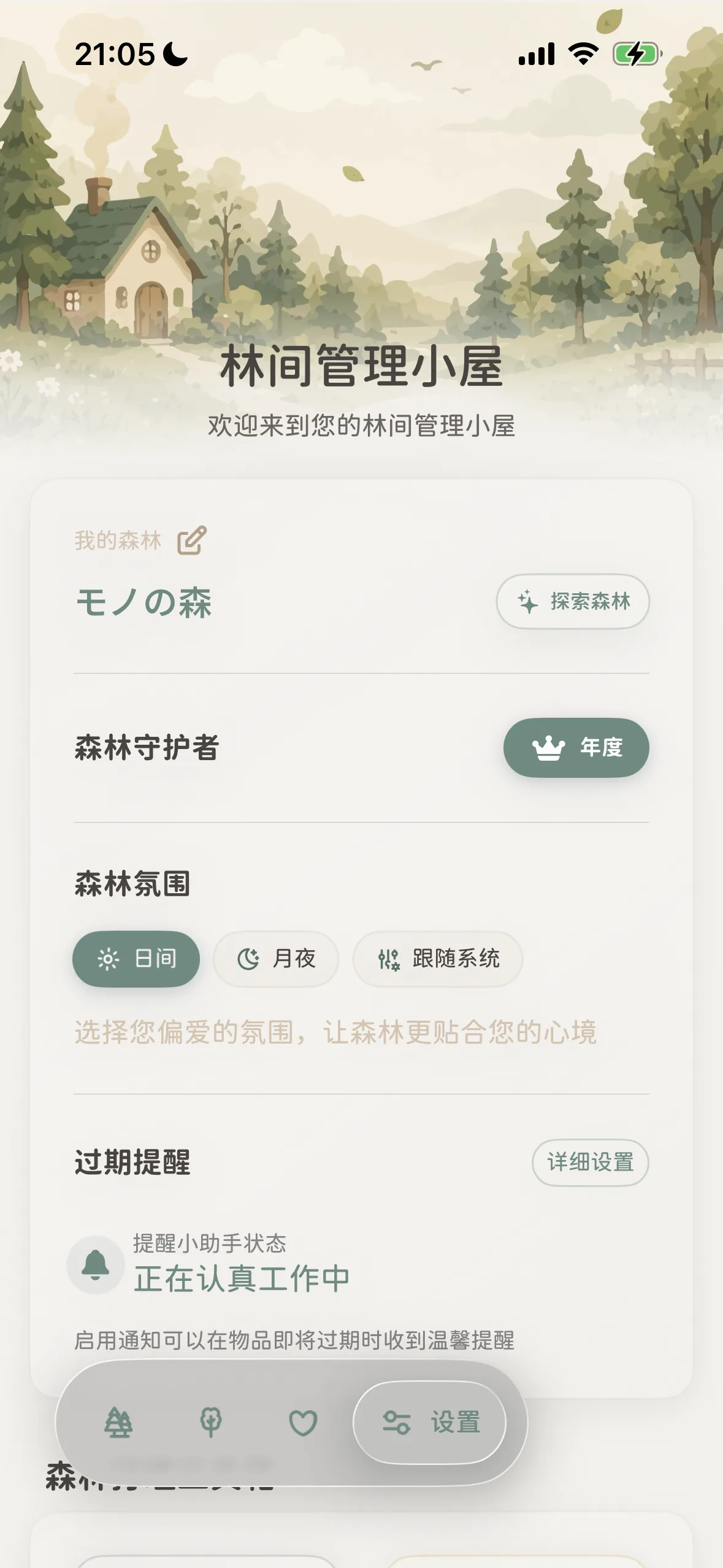 Permanent entrance: In Settings, tap '✨ Explore Forest' next to your forest name
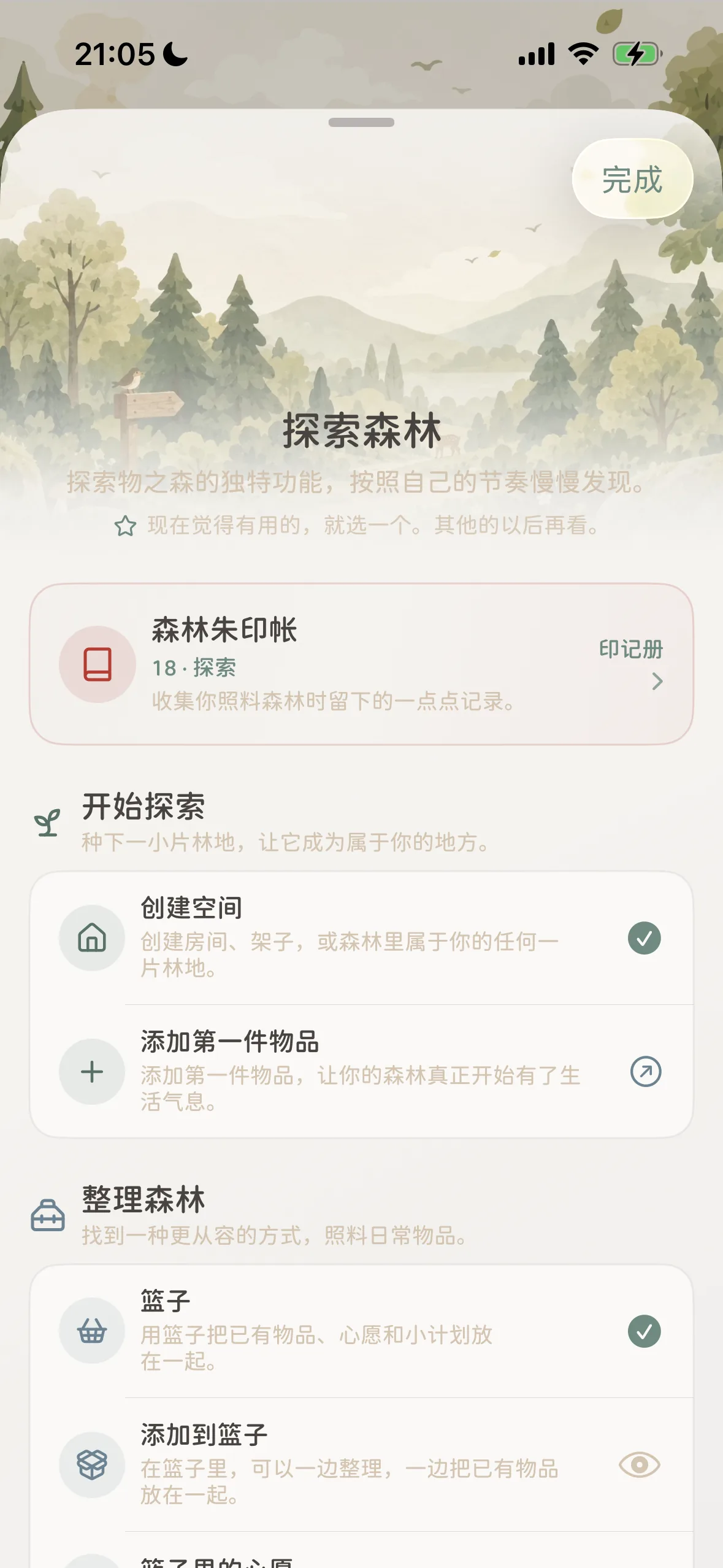 Main sheet: Top Forest Goshuin-cho stamp book with progressive modules below
- Tap the “Settings” icon (Forest Management Cabin) on the far right of the bottom navigation bar;
- At the top of the page, right beside your forest’s name, you will see an elegant capsule button: ”✨ Explore Forest”;
- Tap the capsule, and the full exploration panel will gently glide up from the bottom of your screen.
📖 Decoding “About This Discovery”: 3 Questions Answered
Tapping any entry in the exploration list opens a tailored “About This Discovery” card. Using three intuitive, life-centered perspectives, it answers all your practical questions:
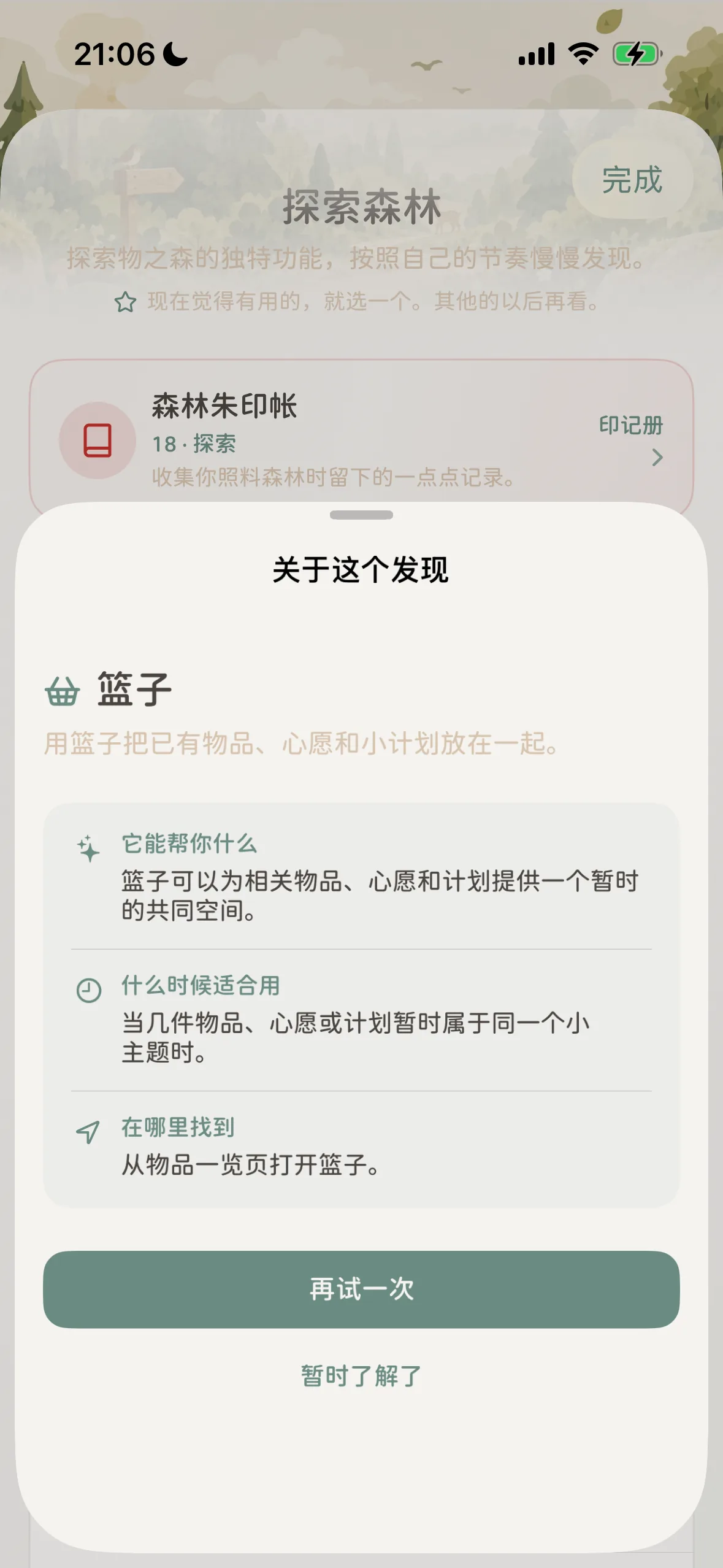 Discovery card: 3-dimensional life guide with a one-tap direct jump button
Take our beloved ”🧺 Baskets” as an example:
- ✨ How It Helps You: “Baskets provide a shared temporary space for related items, wishes, and plans.” Cutting through jargon, it highlights the immediate value of the feature in simple daily terms;
- 🕒 When to Use It: “When a cluster of belongings, wishes, or plans temporarily share a common theme.” Points directly to real-life triggers (packing for a trip, camp shopping, apartment remodeling);
- ✈️ Where to Find It: “Open Baskets from the All Items overview.” Provides clear signposts so you always know where to locate it in the app;
- Direct Action: At the bottom of the card, tap the green “Try It Now” (or “Try Again”) button to jump straight into the feature and start practicing right away.
🗺️ The Forest Map: 5 Exploration Realms
“Explore Forest” thoughtfully organizes dozens of features—from first steps to advanced mastery—into 5 progressive realms:
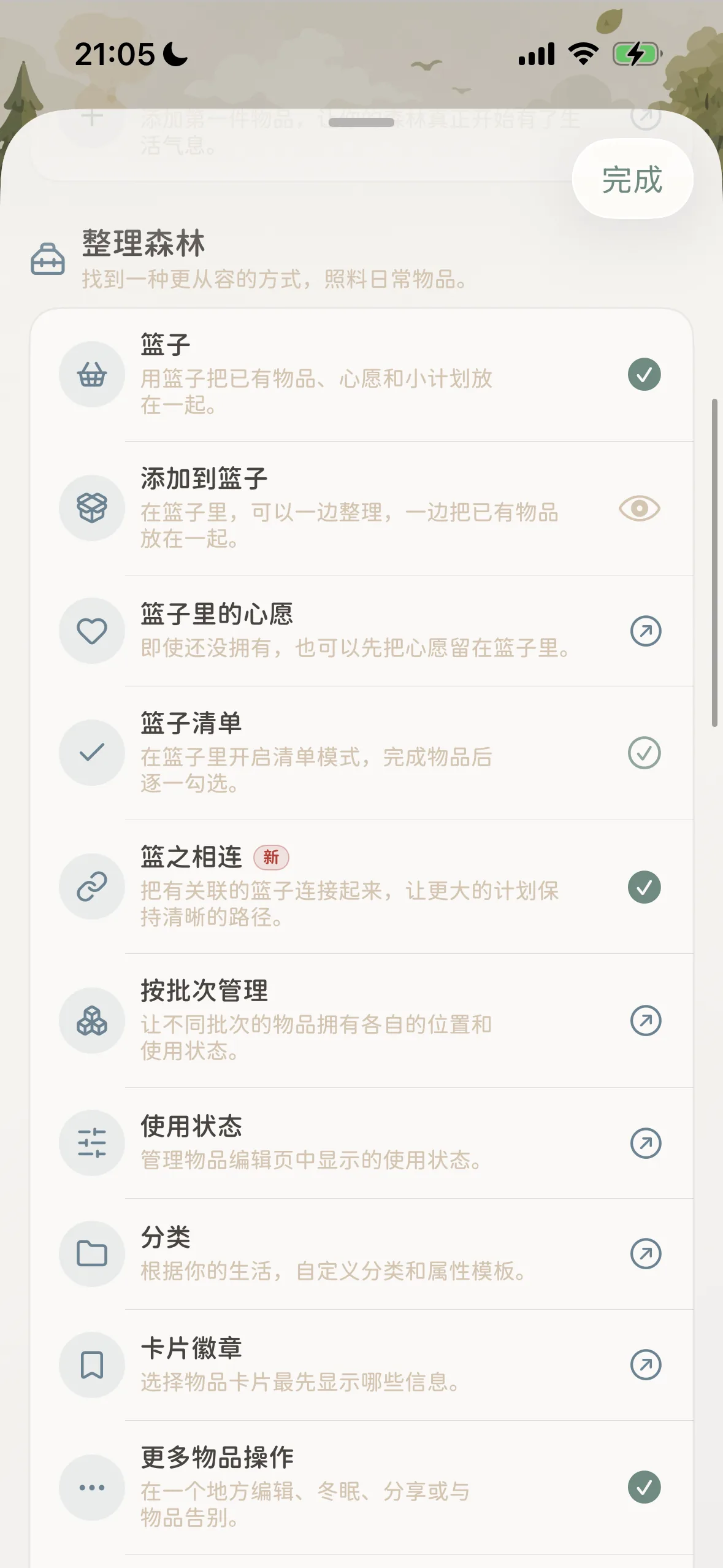 Organizing the Forest: From Baskets and Connections to Batches and Custom Categories
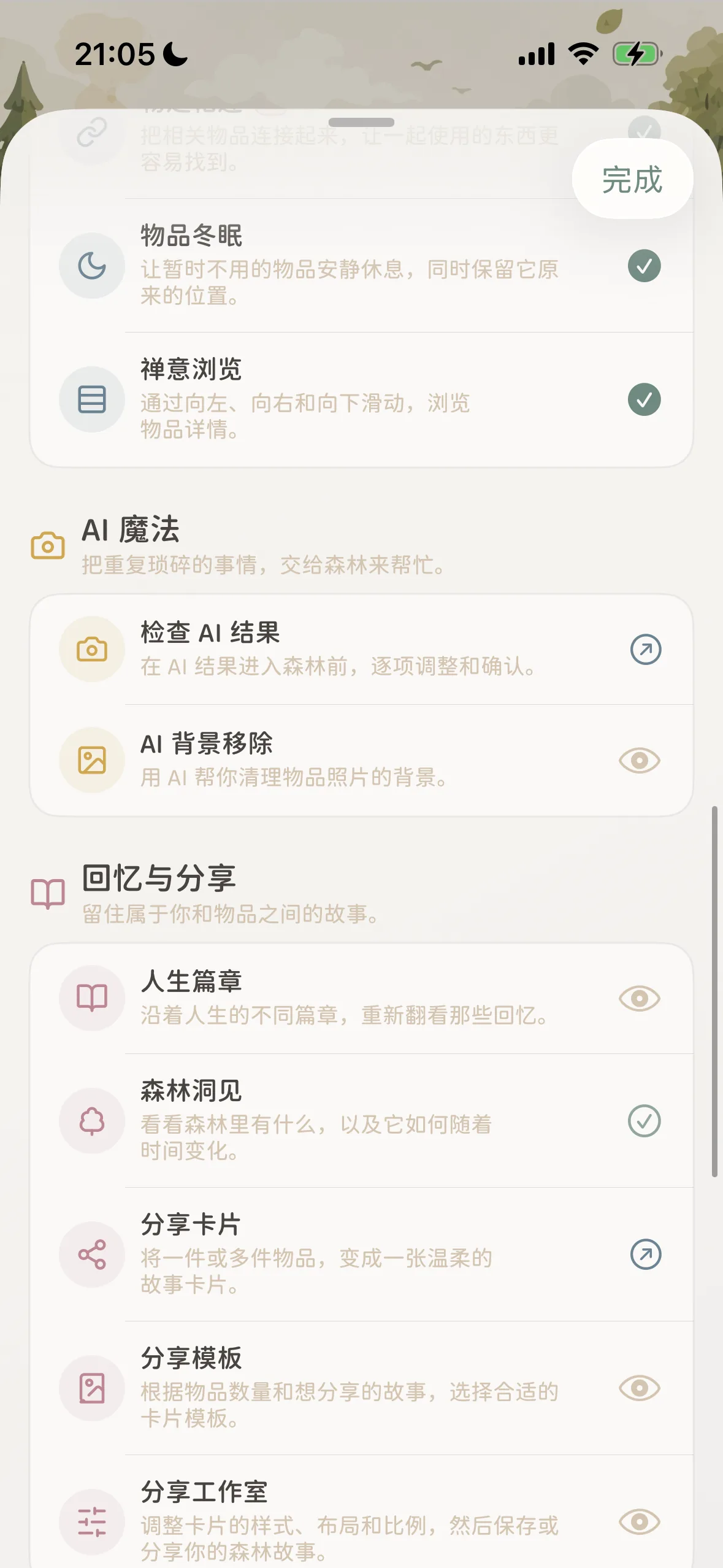 AI & Reflection: AI background cleanup, Life Chapters, and Story Share cards
1. 🌱 Getting Started: Planting Your First Sapling
Designed specifically for newcomers:
- Create Space: Build rooms, shelves, or any sanctuary in your forest;
- Add Your First Item: Take photos and write names, filling your digital forest with daily warmth.
2. 👜 Organizing the Forest: Mindful Custody of Daily Objects
The deep toolbox of MononoMori’s organization philosophy:
- Baskets & Wishes: Gather existing items, future wishlists, and temporary project gear into one light vessel;
- Basket Checklist: Toggle checklist mode to check off packed gear or purchased groceries;
- Basket Connections
[New]: Link interdependent scenarios (checked luggage ⇄ carry-on backpack) for crystal-clear journey tracking; - Batch Management: Track separate storage locations, purchase dates, and expiry dates for identical supplies or consumables;
- Usage States & Categories: Customize service status badges and tailored attributes to fit your lifestyle;
- Card Badges: Choose which key details (price, expiration, or room) take center stage on your item cards;
- Item Connections & Hibernation: Establish two-way companionship or let off-season items rest in quiet concealment;
- Zen Browsing: Glide smoothly left, right, and down with natural gestures to browse item details.
3. 📷 AI Magic: Entrusting Mundane Tasks to the Forest
Let gentle intelligence reduce manual friction:
- Review AI Results: Comfortably inspect and fine-tune recognized item details before committing them to your forest;
- AI Background Removal: Automatically strip away cluttered backgrounds with one tap, leaving crisp, elegant silhouettes.
4. 📖 Memory & Sharing: Cherishing Human-Object Resonance
Possessions are not mere tools—they are vessels of memory:
- Life Chapters: Group items by life eras (student days, new homes, career shifts) to revisit nostalgic milestones;
- Forest Insights: Gain bird’s-eye views of total counts, category distributions, and growth timelines;
- Share Cards & Studio: Select cherished items and compose warm story cards using refined templates to share with loved ones.
5. 📦 Forest Guardian: Unwavering Peace of Mind
Protecting your digital foundation:
- Data Management: Keep memories safe through multi-device synchronization, periodic backups, and seeding imports.
⛩️ Forest Goshuin-cho: Collecting Footsteps in Time
At the top of “Explore Forest,” you will find a serene “Forest Goshuin-cho (Stamp Book)” card:
Inspired by collecting red seals while wandering through historic Japanese shrines, each time you explore a new feature (creating your first basket, capturing a background-free photo, or linking companion items), MononoMori quietly stamps a warm mark in your book. It is never a gamified task score, but a poetic footprint celebrating your mindful dialogue with your belongings.
🎁 Upcoming Revamp Preview
The version visible today is an early preview edition. In upcoming releases, the Forest Goshuin-cho will receive a comprehensive, delightful revamp:
- Preserved Milestone Memorials: Every meaningful moment in your forest—your 100th cataloged item, a full year of companionship with an heirloom, or a tender farewell ceremony—will earn a dedicated memorial stamp in the refreshed stamp book;
- Unexpected Little Surprises: As your footprints deepen over time, the stamp book may quietly reveal unexpected little visual easter eggs and delightful gifts, waiting for attentive guardians to discover.
- Status Icon Meanings:
✓Green Checkmark: You have already practiced and mastered this feature in your daily organizing;↗Arrow Icon: Direct jump available—tap to immediately open and experience the feature;👁️Eye Icon: Tap to expand the “About This Discovery” card and learn its design philosophy.
💡 Explore Forest Navigation Overview
| Realm | Representative Feature | Ideal Life Scenario | Core Exploration Value |
|---|---|---|---|
| 🌱 Getting Started | Create Spaces, Add First Item | Newly downloaded app, moving to a new home, or starting a declutter journey | Establish your own digital woodlands and lay down your first footprints. |
| 👜 Organizing the Forest | Baskets & Checklists | Short trip packing, camping gear prep, weekend shopping lists | Gather temporary, dynamic tasks together; pack, check off, and clear out. |
| 👜 Organizing the Forest | Basket Connections [New] | Checked luggage ⇄ carry-on bag synergy, shelter kit ⇄ camp cooking kit | Coordinate multiple scenario lists so larger plans stay structured. |
| 👜 Organizing the Forest | Batch Management & Usage States | Skincare stockpiles, vintage teas or wines, seasonal wardrobe turnover | Track different batches and locations for identical items, avoiding overbuying. |
| 👜 Organizing the Forest | Item Connections & Hibernation | Camera with multiple lenses, winter coats and outdoor gear | Form two-way companion bonds; let dormant seasonal items rest out of sight. |
| 📷 AI Magic | Background Removal & Smart Capture | Photographing gear on busy desks, rapid cataloging of new purchases | Clean up visual clutter automatically for clean, catalog-grade imagery. |
| 📖 Memory & Sharing | Life Chapters, Story Cards | Graduations, inherited heirlooms, sharing favorite daily essentials | Record the human stories behind objects and craft serene cards for friends. |
| 📦 Forest Guardian | Data Sync & Multi-format Backups | Upgrading phones, cross-device viewing, periodic cold backups | Your data belongs entirely to you, offline-ready and fully secure. |
❓ Frequently Asked Questions
Q1: How does the green checkmark ✓ light up? Do I have to check it manually?
It is completely automated and requires no manual marking.
Whenever you perform an action naturally in your daily life (such as creating your first basket, creating an item batch, or removing a background), MononoMori automatically illuminates the green circle ✓ and records your milestone. You can revisit your footprints whenever you like.
Q2: Am I required to try out every single feature? Are there red notification badges?
No, there are zero notification dots and no forced tasks. The purpose of “Explore Forest” is to act as a quiet trail marker, not homework. MononoMori firmly upholds a distraction-free philosophy. Features you don’t need can simply be left alone; when you run into new organizing hurdles, simply drop by for inspiration.
Q3: Why do some items show a jump arrow ↗ while others show an eye 👁️?
↗Jump Arrow: Appears on concrete, operational settings (e.g., “Add First Item”, “Category Templates”, “Card Badges”). Tapping it immediately takes you to the relevant screen;👁️Eye Icon: Appears on conceptual, multi-step, or scenario-based features (e.g., “AI Background Removal”, “Life Chapters”, “Add to Basket”). Tapping it opens the “About This Discovery” card to gently explain when and why it shines.
Q4: When new features launch, how can I find them here?
With every new release of MononoMori, new capabilities are immediately cataloged in “Explore Forest” with a distinct New badge (such as “Basket Connections” in version 2.5.0). Whenever you update the app, take a leisurely stroll through “Explore Forest” to see what new paths have emerged!