Item Connections & Basket Connections
Master MononoMori 2.5.0's connection system: from companion accessories with 'Item Connections' to multi-scenario lists with 'Basket Connections'. Mirror live status, awaken dormant gear with one tap, and weave mindful bonds between your belongings.
Page Overview
Everything Resonates: Weaving Mindful Bonds Between Belongings and Scenarios
“No possession is an isolated island. A camera body remembers the breath of its lens, a tent cherishes the guard of its ground pegs, and a beloved journal waits quietly for its familiar bookmark. When belongings connect, daily life finds its gentle resonance.”
In our daily routines, many of our favorite belongings do not exist in isolation—they naturally live as pairs, kits, and faithful companions:
- Digital Photography: A mirrorless camera body, prime portrait lenses, wide-angle zoom lenses, spare batteries, and high-speed SD cards tucked into separate protective pouches;
- Outdoor Camping: An ultra-light two-person tent, matching aluminum alloy pegs, reflective guyline sets, and a fitted ground cloth—miss a single piece, and pitch night turns chaotic;
- Mindful Skincare: A soothing repair essence paired with a dedicated emulsion and gentle cotton pads to nurture your skin harmoniously;
- Stationery & Journaling: A favorite leather journal, lovingly clipped with a handcrafted fountain pen and a vintage copper bookmark.
When you record these items as isolated entries, it’s easy to forget where supporting accessories are stored or whether consumable supplies are running low.
In MononoMori 2.5.0, we introduce the new “Item Connections” and “Basket Connections” system: Without rigid hierarchical clutter, a single gentle tap builds bridges of mutual care between items and between scenario lists.
🍃 The Philosophy of Connections: Symmetric Resonance
In conventional organizing apps, “linking” is often treated as a rigid “parent ➔ child” tree hierarchy, which overcomplicates simple daily life. MononoMori embraces a more natural, mindful philosophy:
- Symmetric Resonance: The bond is balanced and equal. When you link a prime lens to your camera body, your camera body automatically mirrors inside the prime lens’s details. No duplicate configuration—each knows the other.
- Live State Mirroring: Connections are not just static navigation shortcuts; they serve as live windows into each other’s status. Whether a companion is currently in active daily use, marked as low in stock, or tucked away in seasonal “Hibernation,” you’ll see it at a glance.
- Harmonized Scenarios (Basket Linkage): Beyond individual objects, the packing and scenario “Baskets” you rely on can also be woven together. A 28-inch checked suitcase links with your carry-on backpack, and a home-makeover checklist coordinates with your daily wishlist.
🔗 Item Connections: Linking Possessions with Care
MononoMori honors visual restraint and the beauty of white space. When an item has no connections, its detail page remains clean and serene without empty placeholder cards. The moment companion items are linked, an elegant “Item Connections” card blooms naturally.
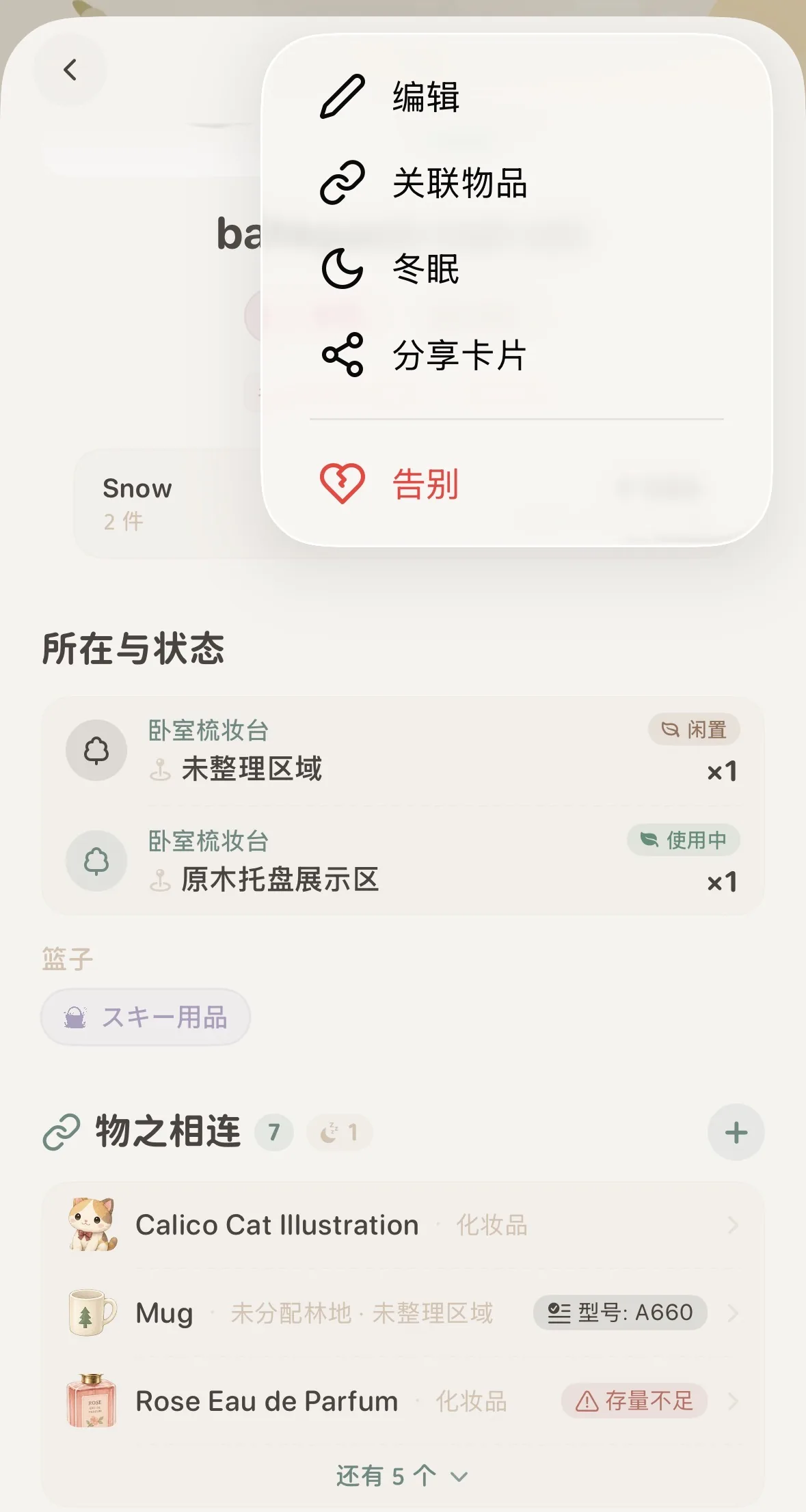 Permanent entry: Tap the top-right '···' menu and choose 'Link Items'
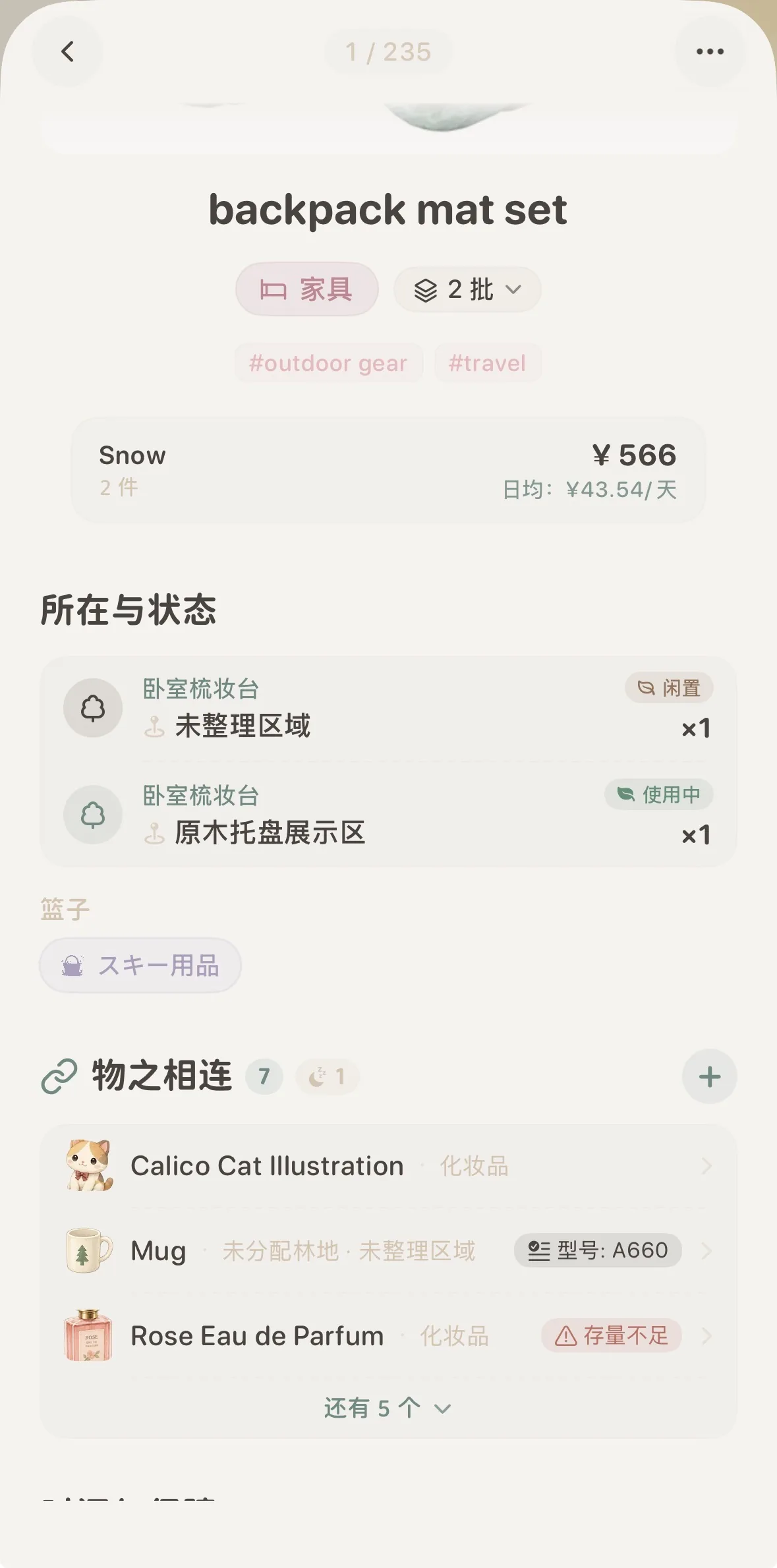 Active connections card: Shows linked companions with a top-right '+' button
Three Natural Ways to Connect:
Whether reorganizing existing treasures or welcoming new gear into your digital forest, MononoMori provides three intuitive paths:
- Permanent Entry (First-time connection for existing items): In any item’s detail view, tap the ”···” button in the top-right corner and select ”🔗 Link Items”. Regardless of whether the item already has connections, this entry is always available and serves as the primary gateway for first-time linking;
- Connect Directly When Adding a New Item: When logging new lenses, spare batteries, or tent pegs into your forest, the New Item creation page allows you to select and connect to existing items directly. Upon saving, both the new accessory and the host item immediately display active connection cards;
- Quick Add via Connection Card (Once items are linked): Once an item has at least one companion, the “Item Connections” card stays visible in its details. To link further accessories, simply tap the refined ”+” button in the card’s top-right corner without opening the main menu.
Selecting Companion Items in the Panel
Tapping either entry brings up a sleek, bottom-sheet selection panel:
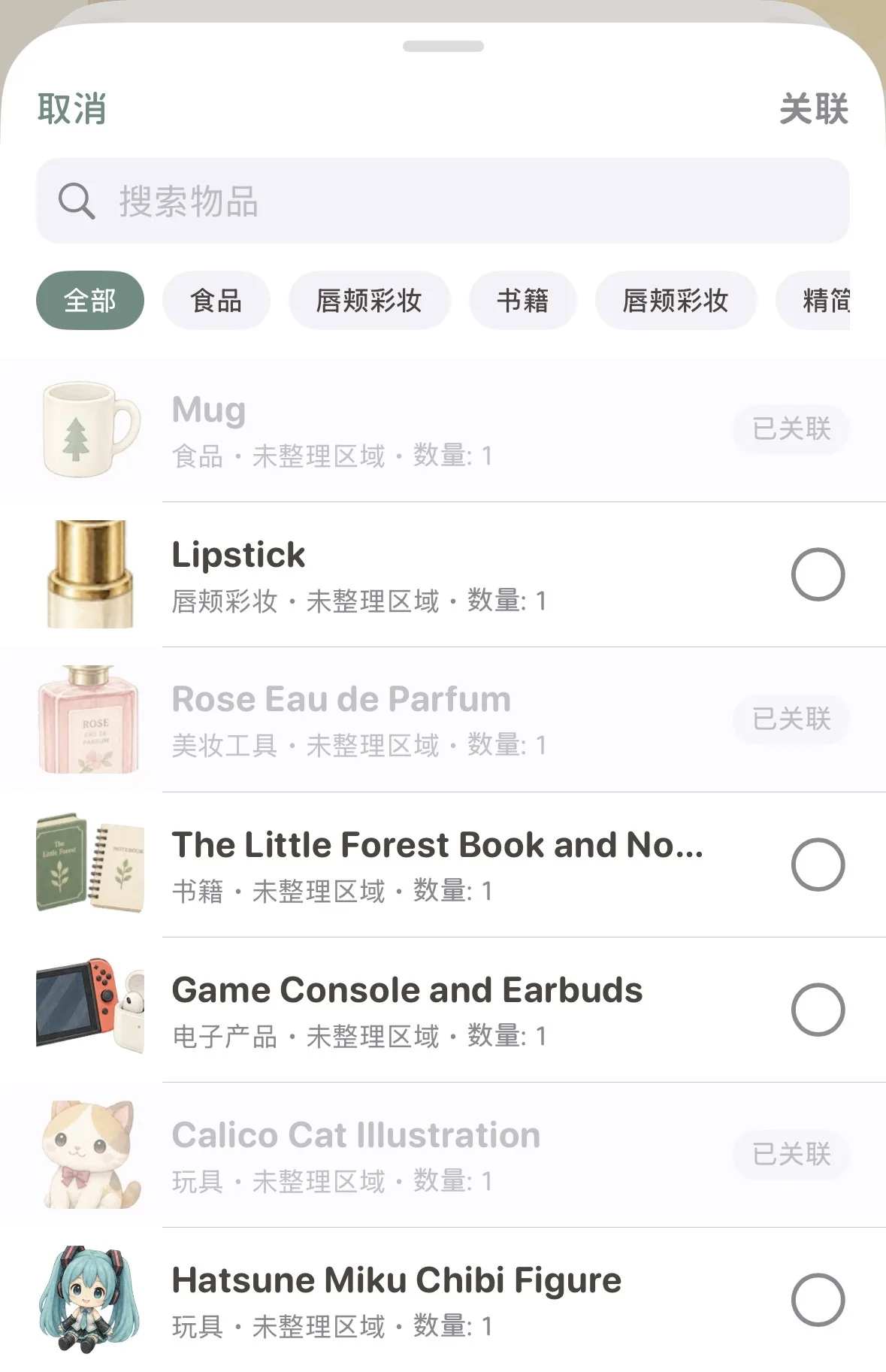 Selection panel: Instant search, category filters, and greyed-out linked states
- Instant Search: Type item names or keywords into the top search bar to filter down to your target piece in milliseconds;
- Category Filter Pills: Tap category capsules below the search bar (such as Foods, Cosmetics, Books, Electronics) to quickly zoom into specific aisles;
- Clear State Distinctions:
- Unlinked Items: Display clean selection circles
○on the right, supporting single or batch selection; - Already Linked Items: Proudly show a subtle “Linked” label and lock into a muted state, preventing accidental duplicates;
- Unlinked Items: Display clean selection circles
- One-Tap Binding: Once selected, tap the deep forest green “Connect” button in the top-right corner, and the two-way bond is instantly established.
💤 Live State Awareness & Instant Hibernation Awakening
Once connected, the card does much more than display titles and storage woodlands—it serves as a live barometer of your accessories’ status:
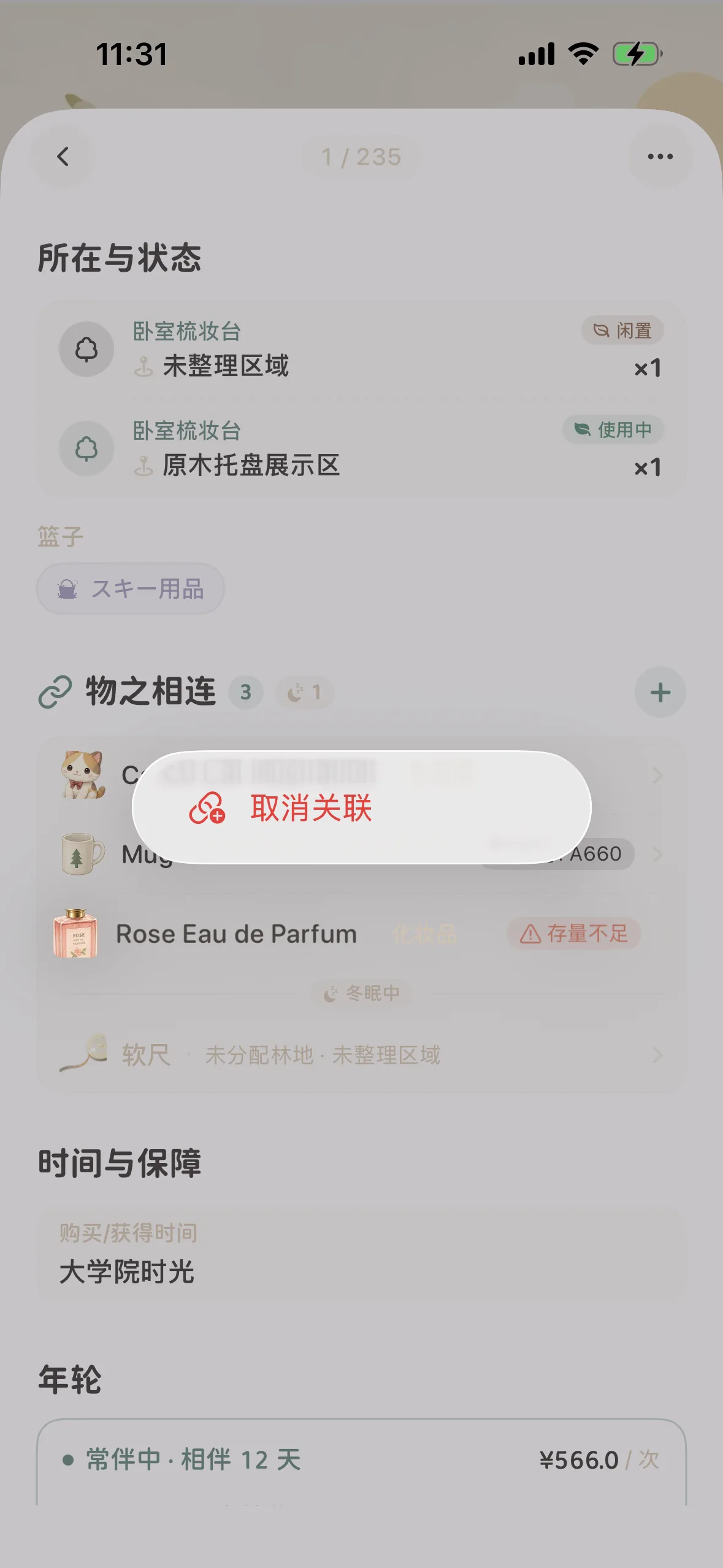 State awareness: Highlights low-stock alerts and gentle '💤 Hibernating' indicators
1. Real-time Inventory Alerts & Location Insight
- Low Stock Warning: When a linked consumable (such as cotton pads or coffee filter paper) is flagged as
⚠️ Low Stock, an alert badge appears on the main item’s card, reminding you to replenish during your next grocery trip; - Woodland & Space Insight: Clear location tags tell you whether an accessory is resting in the “Master Bedroom Nightstand” or the “Entryway Storage Bin,” saving you from unnecessary wandering.
2. Gentle Hibernation Indicators & One-Tap Awakening
Many accessories are inherently seasonal (thermal tent liners, underwater camera housings, wind-straps for summer straw hats):
- Hibernation Indicator: When a connected item is placed into Hibernation, the connection card displays a
💤 1count badge, and the dormant entry is rendered in quiet, low-saturation grey with a💤 Hibernatingtag; - One-Tap Awakening: When a new season starts, you don’t need to dig through global search. Simply tap the dormant accessory directly inside the connections list to jump straight to its detail page, then tap “Awaken” to welcome it back to active service.
✂️ Unlinking: A Gentle Long-Press
Life evolves, and equipment setups change. When you upgrade to a new camera lens or two items no longer belong together, unlinking is as soft and natural as parting clouds:
Data Safety Guarantee: Unlinking only severs the invisible thread connecting the two items. It will never delete either item. Each item’s purchase records, tree-ring stories, storage locations, and high-resolution photos remain 100% safe and intact.
🧺 Basket Connections: Orchestrating Life Scenarios
In MononoMori, “Baskets” are beloved tools for scenario-based packing and checklists—whether organizing flight luggage, gearing up for camping, or planning deep cleaning days.
In version 2.5.0, Baskets receive a powerful upgrade—Baskets can now be connected to one another!
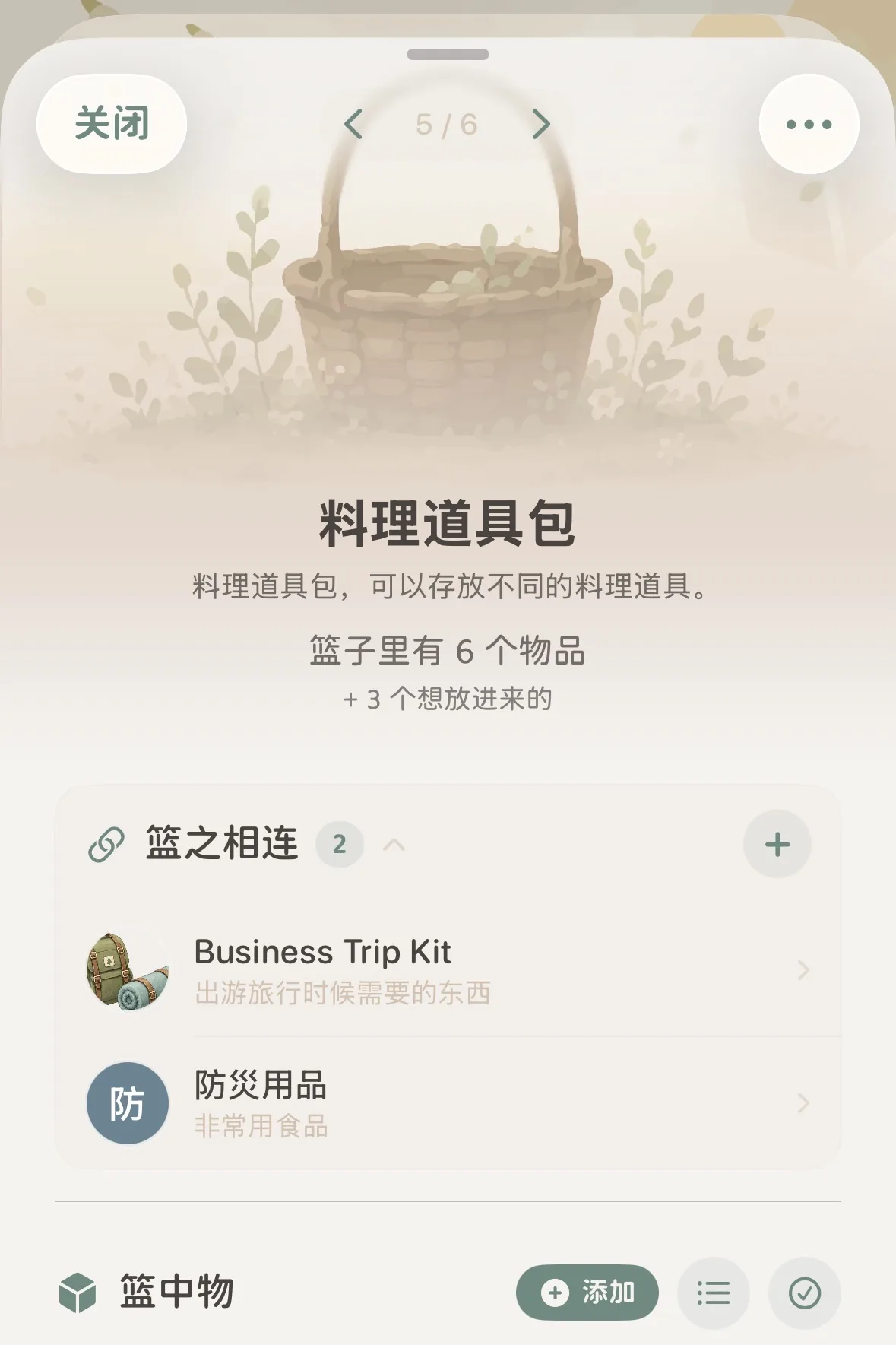 Basket detail view: Clear representation of linked companion baskets
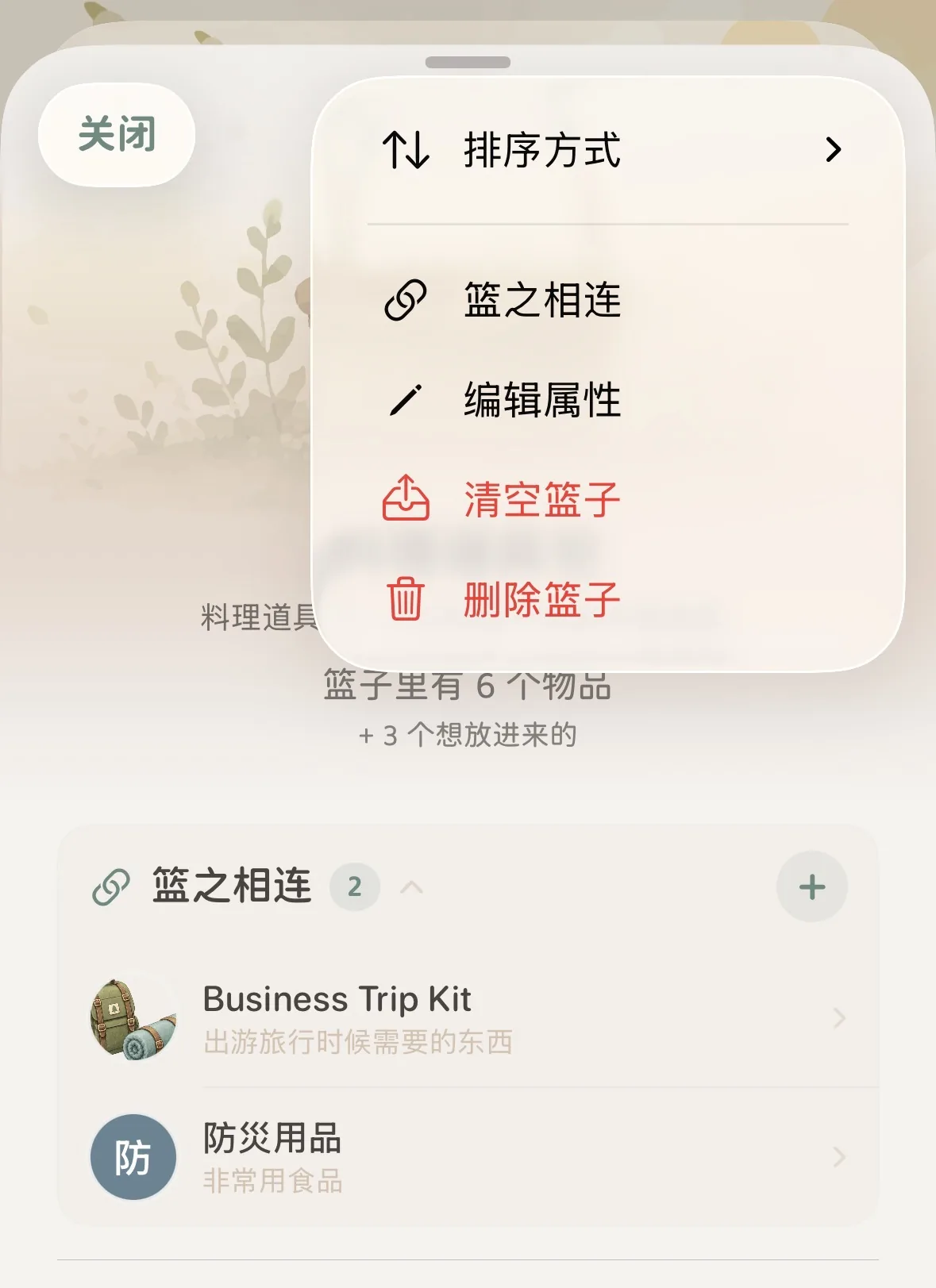 Basket action menu: Tap '···' to select 'Link Baskets'
1. Why Connect Baskets?
Preparation for life moments often spans multiple interdependent contexts:
- Travel Luggage Stratification: A checked 【28-Inch Suitcase】 basket links harmoniously with a 【Carry-On Backpack】 basket;
- Outdoor Field Synergy: A camp cooking 【Culinary Tool Kit】 basket pairs with a safety 【Emergency Preparedness Box】 or 【Travel Essentials Kit】;
- Aspirations & Renovations: A new home 【Furnishing Checklist】 basket harmonizes with a curated 【Wishlist Essentials】 basket.
2. Linking and Unlinking Baskets
- Creating a Connection:
- Permanent Entry (First-time connection): In any basket detail page, tap the top-right ”···” menu and select ”🔗 Link Baskets”;
- Quick Add (When connections exist): Once connected baskets exist and the “Basket Connections” card is active, tap the ”+” button in the card’s top-right corner;
- Check the companion scenario lists you wish to link and save to immediately activate synergy.
- Unlinking Baskets:
- In the “Basket Connections” list, long-press any linked basket item;
- Tap “Unlink” in the popup bubble to release the connection instantly.
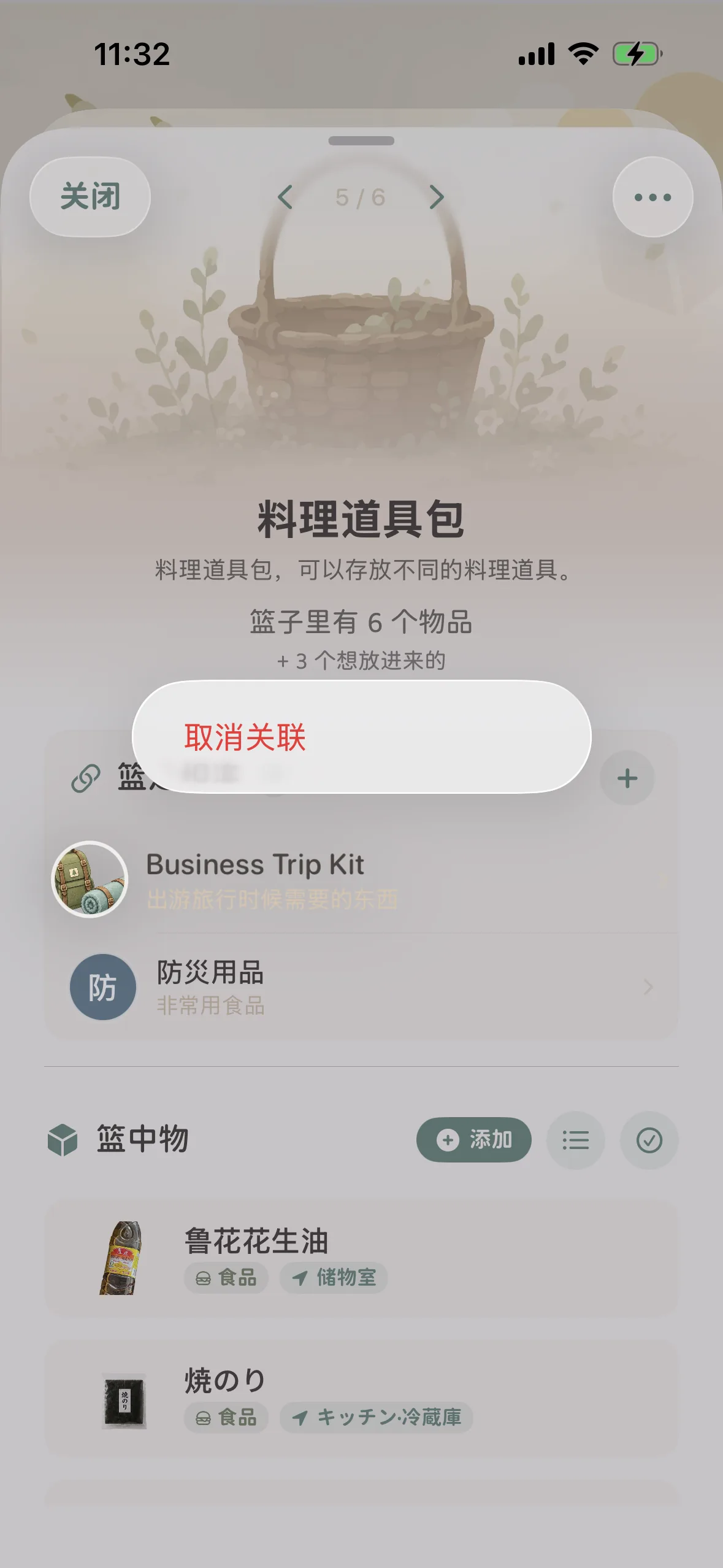 Basket unlinking: Long-press any card to reveal the 'Unlink' action bubble
💡 Classic Life Connections & Companion Combinations
| Life Organization Scenario | Primary Subject | Recommended Item Connections | Recommended Basket Connections | Mindful Synergy & Daily Resonance |
|---|---|---|---|---|
| Digital Photography | Mirrorless Camera Body | Prime lens, zoom lens, spare batteries, SD cards, lens air blower | 【Camera Body Kit】⇄【Tripod & Heavy Gear】 | Camera and lenses stay mutually aware; never leave home without backup power and storage cards. |
| Outdoor Camping | 2-Person Tent | Aluminum ground pegs, guyline set, moisture-proof mat, patch kit | 【Camp Shelter Kit】⇄【Outdoor Camp Cooking Kit】 | Separation of shelter and field culinary supplies, keeping both independent yet closely aligned. |
| Morning Skincare | Daily Repair Essence | Soothing lotion, gentle cotton pads, facial massage tool | 【Morning Refresh Box】⇄【Travel Toiletries Pouch】 | Essence and cotton pads mirror inventory; low stock alerts remind you to reorder timely. |
| Coffee Aesthetics | Pour-over Kettle | Manual coffee grinder, filter paper, digital scale, artisan coffee beans | 【Home Brew Station】⇄【Outdoor Coffee Case】 | Gear and filter paper link together; compare home setup with mobile camping kit at a glance. |
| Long-distance Travel | 28-Inch Luggage | Luggage luggage strap, TSA lock, digital luggage scale | 【Checked Long-haul Luggage】⇄【Light Carry-on Backpack】 | Large checked cargo links with precious boarding essentials; effortless tracking at transit or hotel check-in. |
❓ Frequently Asked Questions
Q1: Are “Item Connections” truly two-way? If I link Item B to Item A, will it automatically show inside Item B?
Yes, completely symmetric and two-way. Connections in MononoMori are built on mutual equality. The moment you link Item B under Item A, Item A’s card automatically lights up under Item B. You never have to configure both sides separately.
Q2: If I unlink or delete one connected item, will it harm the other item?
No, the other item remains completely untouched and safe.
- Unlinking: Only removes the invisible line between them. All photos, purchase notes, tree-ring stories, and space assignments remain 100% intact;
- Deletion or Farewell: If one item is moved to the Recycle Bin or honored in a farewell ceremony in the Memory Forest, the other item remains safe in your active forest. The connection smoothly fades away without accidental cascading deletions.
Q3: How many companion items can I link to a single item? Is there a limit?
There is no artificial limit. You can link over 10 lenses and accessories to a camera body, or dozens of stationery tools to a desk organizer. When an item has numerous connections, an intuitive “X more ⌄” expand/collapse toggle appears at the bottom of the card, preserving visual tranquility.
Q4: Can an item currently in “Hibernation” be linked to other items?
Yes, absolutely.
All items are searchable and selectable in the companion selection panel. If you link a hibernating accessory, it will be labeled with a soft 💤 Hibernating indicator. This allows you to organize seasonal kit relationships in advance, ready to awaken with one tap when the time comes.
Q5: What is the difference between “Item Connections” and “putting items in the same Basket”? How should I choose?
Both features complement each other and serve distinct mental models:
- “Item Connections” represent physical or functional pairings: They celebrate long-term, intimate companionship between objects (camera and lenses, tent and pegs, skincare essence and cotton pads);
- “Baskets” represent dynamic, scenario-driven collections: They cater to moments, tasks, and journeys (e.g., 【Weekend Camping List】, 【3-Day Business Trip】, 【Decluttering Batch】), designed to be packed or cleared once the event concludes. By combining Item Connections with Basket Connections, you enjoy both deep item companionship and fluid scenario coordination.