Item Hibernation
Discover MononoMori's Hibernation feature. Temporarily tuck away seasonal gear, items in decluttering hesitation, or low-frequency belongings to keep your daily space clean, with instant search retrieval and one-tap awakening.
Page Overview
Create a peaceful resting corner for belongings not currently in use
“Not every seldom-used item requires an immediate goodbye, nor must every possession remain in plain sight. Granting belongings a quiet slumber gives your daily life room to breathe.”
When organizing your everyday belongings, do you often encounter dilemmas like these?
- Heavy down jackets, large floor fans, or oversized suitcases sit unused for most of the year, yet browsing past them every day makes your primary list feel cluttered;
- A thoughtful gift from a friend or a special dress that you rarely wear isn’t needed right now, but parting with it feels premature;
- Appliance warranty cards, paper manuals, and spare parts rarely need your attention—you only keep them as an insurance record.
Leaving these items in your daily primary list clutters your workspace; moving them directly to Memory Forest or deleting them is too drastic when you might need them again later.
The Hibernation feature in MononoMori resolves this exact tension: it functions as your digital seasonal storage container and mindful buffer zone, letting quiet items rest unobtrusively while remaining instantly searchable and ready to awaken.
🍃 What Is Hibernation?
In MononoMori, every item reflects the natural rhythm of everyday life:
- Active: Items currently in use, visible across your woodland areas and rooms;
- Hibernating: The item remains firmly in your real life, quietly resting out of sight without cluttering your daily browse;
- Memory Forest (Farewell): Items that have departed your active life, preserved as cherished memory entries;
- Recycle Bin: Incorrectly entered records or items marked for permanent removal.
When you put an item into Hibernation:
- Daily Invisibility: It automatically tucks away from the main forest, room lists, and daily categories, restoring calm white space;
- Preserves Complete Records: Hibernation updates status without deleting data; all notes, dates, and fields remain intact;
- Filter-Based Retrieval: Hidden by default, hibernating items are easily surfaced by switching Hibernation Mode in the Overview filter to “All Items” or “Hibernating Only”;
- Instant Awakening: When the season turns or an item returns to service, a single tap brings it back into active rotation.
🌙 How to Put an Item into Hibernation
The process is intuitive and takes just a moment:
- Open the item’s Detail View;
- Tap the ”···” menu button in the top right corner;
- Select “Hibernate” (marked with a crescent moon icon) from the action sheet.
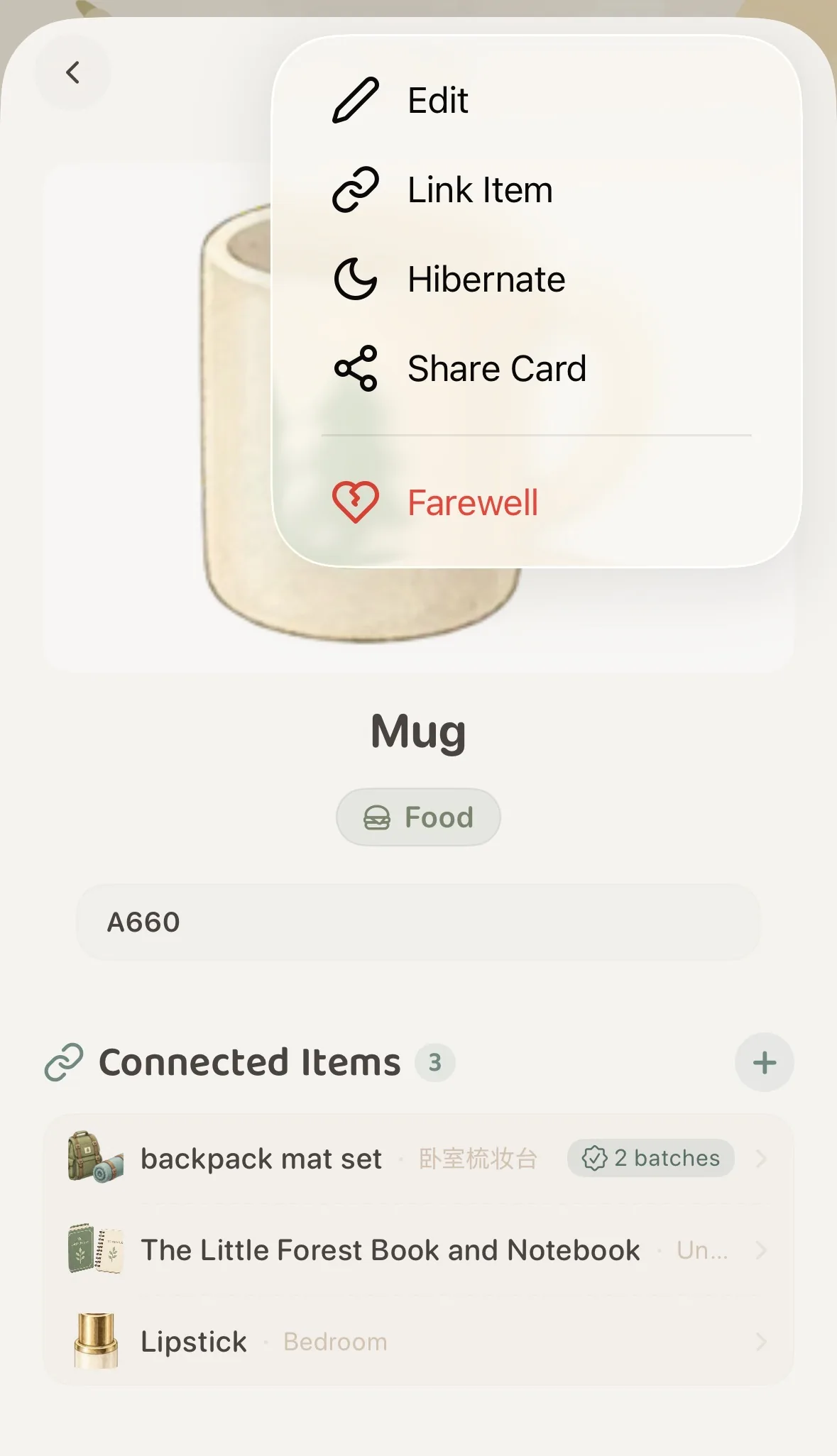 Tap the top-right menu and choose "Hibernate"
Once hibernated, a gentle banner appears across the top of the item’s detail view: “Item is hibernating · Resting quietly, hidden from daily browsing.”
Returning to your main screen, the item has gracefully stepped into the background, leaving your primary forest clean and open.
🔍 How to Find Hibernating Items
Hibernation does not mean forgetting. When you need to inspect or audit your resting belongings, MononoMori provides two convenient paths:
Method 1: Global Search Bar (Instant Recall)
First switch Hibernation Mode in the Overview filter panel to “All Items” or “Hibernating Only”, then type in the search bar. If the filter is still set to “Active Only”, resting records remain hidden. Status badges and actions reflect current page settings:
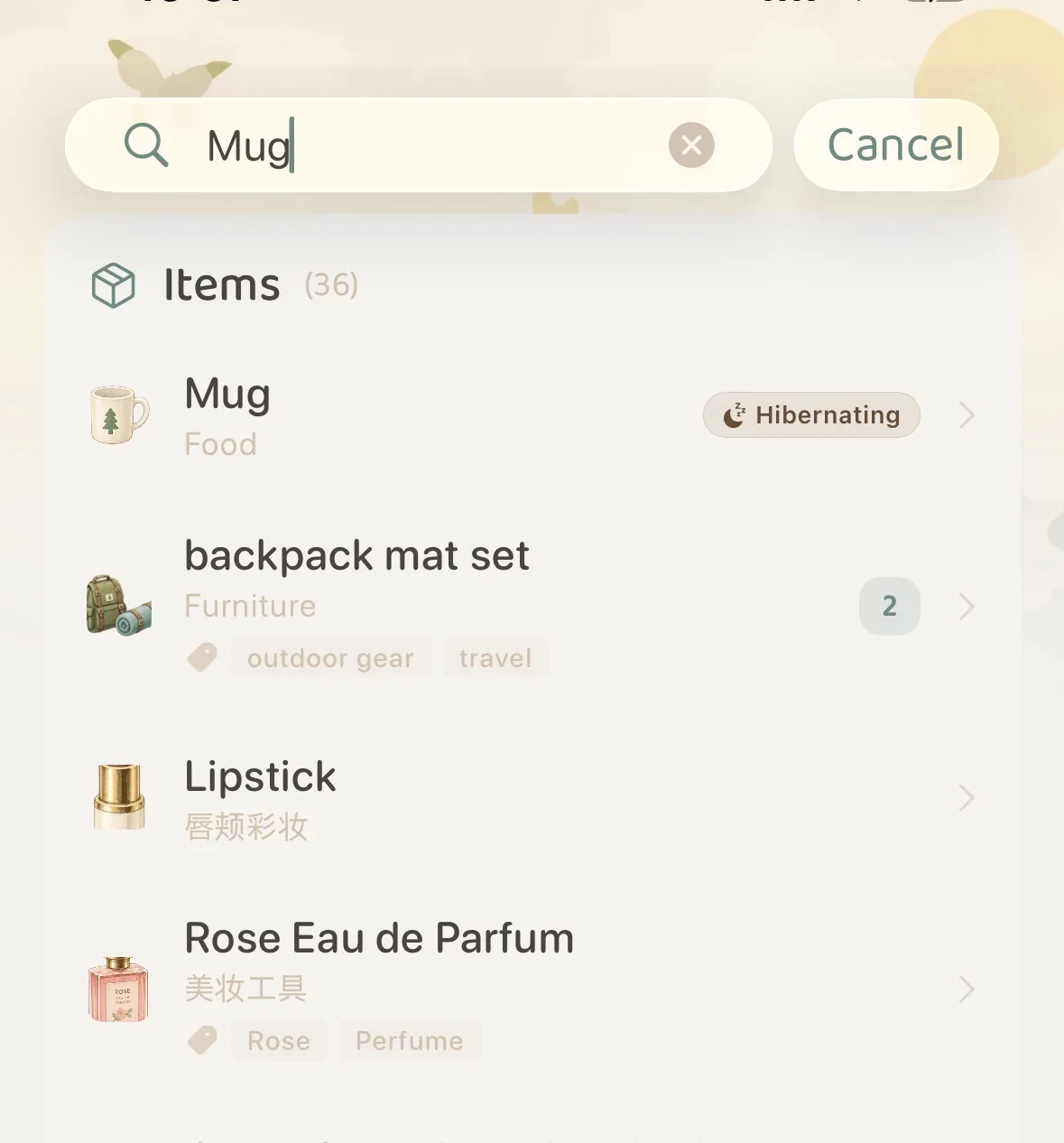 Global search highlights items with a dedicated "💤 Hibernating" badge
Tap the search result to open the item detail view, view its information, or wake it up immediately.
Method 2: Advanced Filter Panel (Seasonal Audits)
When seasons change and you want to review everything packed away in seasonal storage:
- Tap the Filter icon (funnel shape) on the right side of the toolbar;
- Switch to the “More” tab at the top of the panel;
- Locate the “Hibernation Mode” card and select your preferred display mode:
- Active Only: (Default) Hides hibernating items to maintain a calm daily overview;
- All Items: Displays both active and hibernating items side by side;
- Hibernating Only: Isolates only resting items, giving you an instant tally of boxed and seasonal belongings.
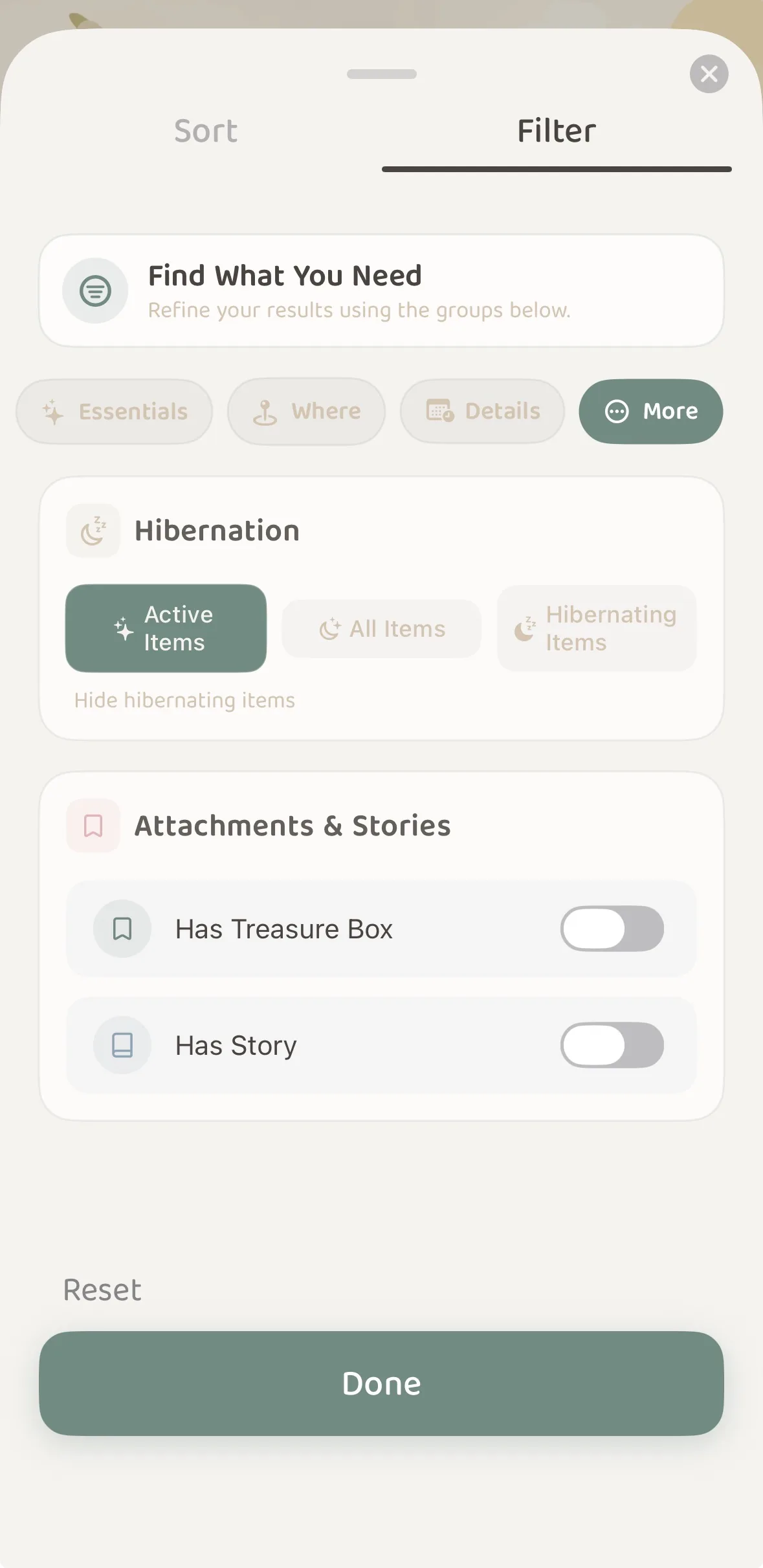 Advanced Filter "More": switch between Active Only, All Items, or Hibernating Only
☀️ How to “Awaken” an Item
When spring arrives or you are ready to put an item back into daily rotation, restoring it is effortless:
- Locate and open the item’s Detail View via search or filter;
- Locate the “Awaken” button (sun icon) on the right side of the top banner;
- Tap “Awaken” to instantly restore the item to active status, making it visible again in your primary forest and room spaces.
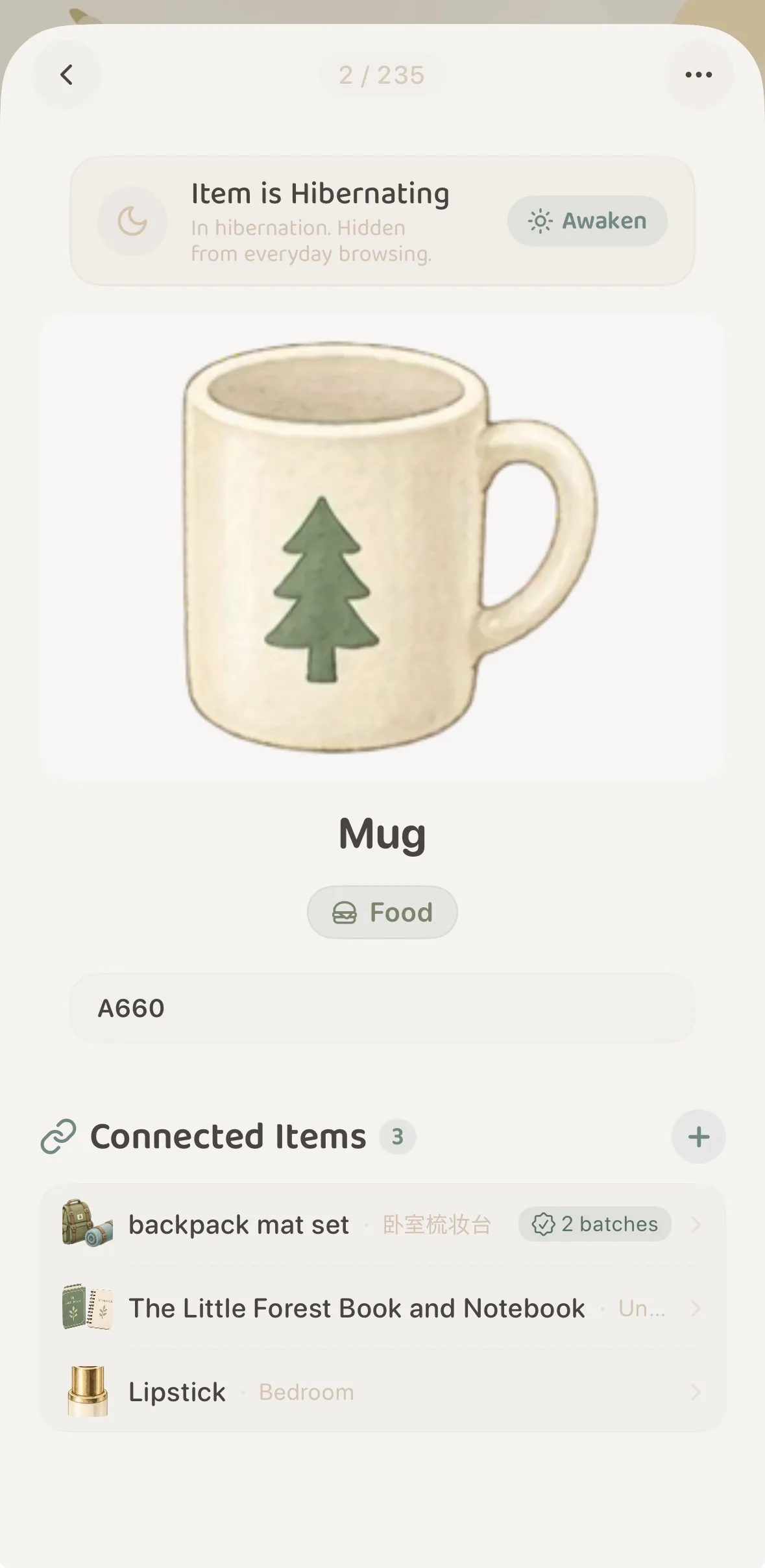 Tap "Awaken" at the top of the detail view to restore immediately
🔗 Hibernation and Item Connections
A common question is: “If I hibernate a charger, storage case, or accessory, will connected items be broken?”
Not at all.
- Linkages between paired belongings remain completely intact;
- When viewing connected accessories from another item, hibernating companions appear in a gentle muted tint accompanied by a
💤 Hibernatingindicator; - You always know your accessory bundle is accounted for without suffering unnecessary visual noise in daily browsing.
💡 Which Items Benefit Most from Hibernation?
Mindful decluttering emphasizes keeping in-season items accessible while tucking off-season belongings away. We recommend hibernating:
- Seasonal Wardrobe & Home Appliances:
- Down coats, heavy blankets, and space heaters stored away during summer;
- Cooling mats, parasols, desk fans, and swimwear packed away during winter.
- Specialized Low-Frequency Gear:
- Camping tents, outdoor folding chairs, snowboards, and international luggage.
- The Mindful “Hesitation Box”:
- Keepsakes or clothing you rarely reach for but cannot bear to part with. Hibernate them for 3 to 6 months; if you never thought of them during that time, you can mindfully bid farewell. If you missed them, awaken them at any point.
- Reference Records & Spare Hardware:
- Appliance warranties, paper instructions, spare screws, and mounting brackets kept strictly for reference.
- Borrowed or Repaired Goods:
- Books lent to friends or watches sent out for servicing. Tucked into hibernation until they safely return.
❓ Frequently Asked Questions
Q1: What is the difference between Hibernation and Farewell (Memory Forest)?
- Hibernation: The item is still in your possession, merely tucked away in a closet or seasonal box. It can be awakened back to your active list at any time.
- Farewell: The item has left your daily life (gifted, sold, recycled, or worn out). MononoMori preserves its photos and memories permanently under the starry skies of Memory Forest.
Q2: Are photos or notes stripped when an item hibernates?
Hibernation simply conceals an item from everyday views without deleting anything. Photos, notes, tags, and locations remain completely accessible. Cross-device syncing depends on whether iCloud Sync is enabled; you can also export manual backups anytime.
Q3: Can I edit an item while it is hibernating?
Yes. Open the item’s detail view through search or filtering, and tap the top-right menu to edit information, add tags, or record new Moments in Time as usual.