
The Memory Forest & Moments in Time
Explore MononoMori's Memory Forest and Moments in Time chronicle. Stroll through seasonal timelines, encounter past belongings in 'Today's Reunion', and trace the full life rings of physical and experiential memories.
Page Overview
When belongings complete their journey, let shared memories remain forever radiant in the forest
“Belongings may have a finite lifespan, but the warmth of companionship never fades. Physical space belongs to the present; emotional space belongs to memories. Letting go of an item is not forgetting it; rather, we welcome its soul and story into an everlasting forest.”
💡 Navigation Guide: If you have not yet experienced the farewell ceremony, or wish to understand the dual-track routing between quick cleanups and mindful farewells, please refer to our foundational guide: Item Deletion & Farewell Ritual. This article focuses on your spiritual sanctuary—strolling the Memory Forest, the heartwarming encounters of Today’s Reunion, and the Moments in Time chronicle deeply woven into an item’s active life rings.
🌌 Entering the Memory Forest: A Tranquil Sanctuary & Seasonal Chronicles
Tap the “Memory” tab (marked with a gentle heart icon) on the bottom navigation bar to step into your private Memory Forest.
Free from the clutter of daily inventory tasks and the friction of organizing, this space is an uncluttered, serene digital museum of your life.
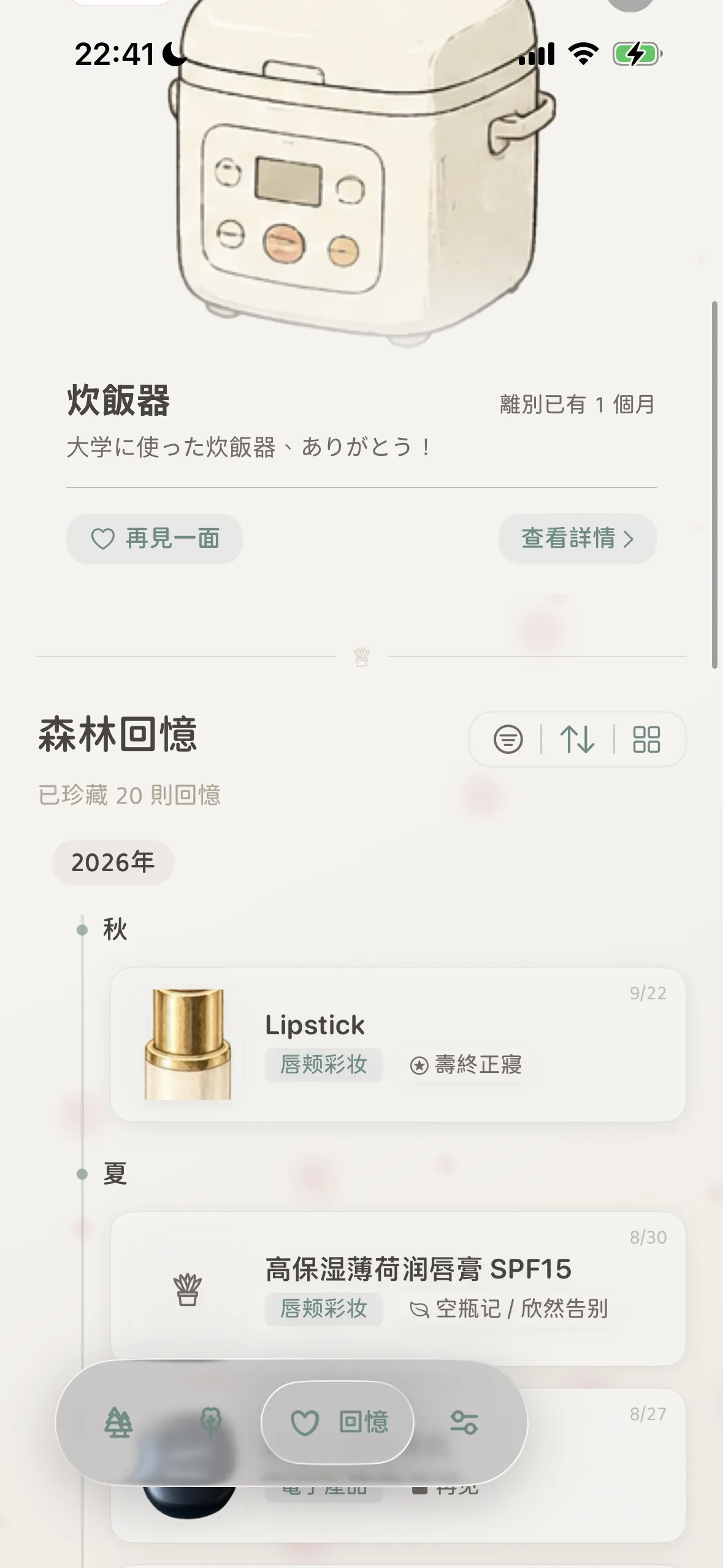
1. Today’s Reunion: Serendipitous Touches of Warmth
At the top of the Memory Forest, MononoMori presents a special “Today’s Reunion” card curated each morning by an empathetic time algorithm:
- You might wake up on a quiet morning to meet a rice cooker you parted with a month ago, reading the note you wrote: “Thank you for fueling my college years!”
- It may arrive on the anniversary of an item’s acquisition, the anniversary of its farewell, or on days when life is bustling and you need a calming reminder of where you started;
- Tap “Meet Again” or “View Details” to revisit that warm sentiment, letting past gratitude soothe present fatigue.
2. Seasonal Timeline Scrolls: Natural Sediment of Time
Beneath Today’s Reunion, items rest along a fluid timeline organized by Year and Season (e.g., Autumn, Summer, Spring, Winter 2026):
- Annals of Possessions: Each card clearly highlights the farewell date, category, and specific departure reason (such as “Mission Accomplished”, “Emptied & Grateful”);
- Flexible Views & Filters: Use the top-right toolbar to filter by reason, toggle chronological or reverse order, and switch effortlessly between an immersive photo gallery and a detailed list view.
📜 Moments in Time (Life Rings): Connecting the Whole Life Story
In MononoMori’s design philosophy, a farewell card is never an isolated snippet of text.
Every belonging carries an active “Life Ring” throughout its daily companionship in your home. Every quick note you penned, every reflection you captured, and every room or storage box migration you logged were tenderly engraved into its ongoing chronicle.
When an item finally completes its service and is celebrated with a farewell ritual, its departure reason, final thoughts, and parting moments are seamlessly integrated into a unified “Moments in Time” scroll.
Opening an item’s memory detail allows you to rediscover every chapter, move, and note of your shared history:
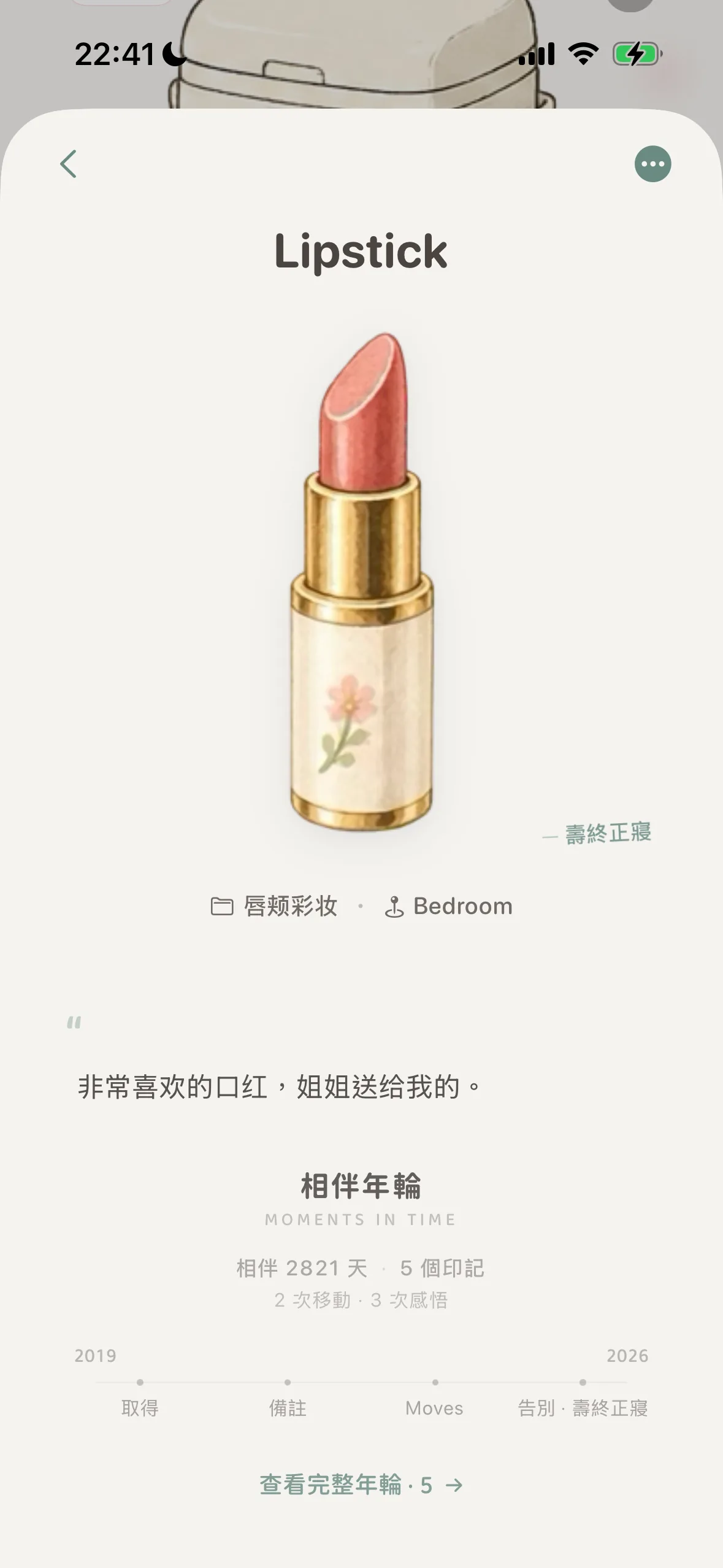
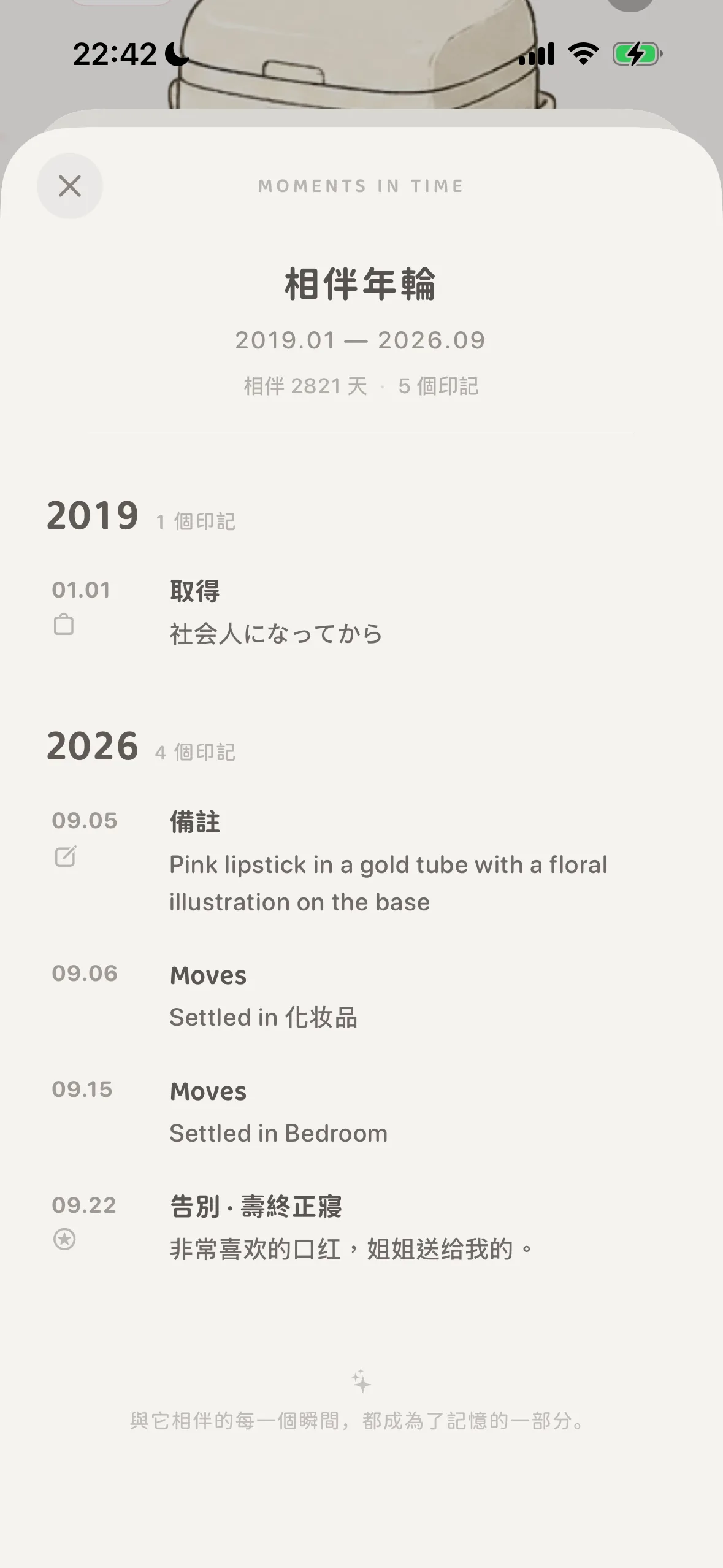
1. Companion Statistics: Giving Weight to Time
Combining the item’s initial creation date with its farewell moment, MononoMori calculates your shared journey with precision (e.g., “Together for 2,821 days · 5 Marks · 2 Relocations · 3 Reflections”). What once seemed like an ordinary object suddenly reveals the profound weight of shared time.
2. Vertical Timeline Scroll: Tracing a Full Life Story
Tap “View Full Life Rings” to expand an unbroken vertical scroll charting the item’s presence in your life:
- Acquisition Milestone: When it first joined your life and which chapter you were in (e.g., 2019.01.01 Acquired · Early Career);
- Living Traces & History: Notes added over time, photos captured during seasonal changes, and location shifts from a makeup vanity to a bedroom cabinet;
- Farewell Finale: The departure reason and heartfelt reflections that closed its physical chapter (e.g., 2026.09.22 Farewell · Mission Accomplished);
- The closing inscription at the foot of the scroll: “Every moment shared with it has become part of who you are.”
✈️ Expanding Horizons: Preserving Non-Physical Experiences & Travel Memories
Many assume MononoMori is strictly for pots, pans, and apparel. In truth, mindful organizers use it to preserve non-physical, intangible life experiences:
“Recording belongings is ultimately recording evidence of our connection to the world.”
1. An Unforgettable Journey to Distant Lands 🎒
- How to Chronicle: Create a new item named “2025 Kyoto Autumn Leaves” and upload a signature landscape photo or ticket stub;
- Farewell Reflection: When you return home, hold a gentle “Farewell Ritual” for the journey, selecting reasons like “Special Keepsake” or “Heartfelt Satisfaction”;
- Cherished Memory: Write down the feeling of sipping coffee in Arashiyama and the smiles of travel companions. Even after paper passes fade, the essence of the trip stays preserved forever in the Memory Forest, ready to surprise you in future “Today’s Reunions.”
2. Ephemeral Experiences & Digital Milestones 🎟️
- Concerts & Festivals: Photograph wristbands and festival passes, write down how the music felt, and let the paper clutter go without guilt;
- Gaming Triumphs & Certificates: Hundreds of hours poured into an epic adventure, or a hard-earned professional certification;
- Bulky Family Photo Albums: Digitally scan aging, mold-prone physical albums into MononoMori with family backstories, safely lightening physical storage boxes.
🔄 Reversals & Rebirth: Can You Undo a Farewell or Bring an Item Back?
In MononoMori, letting go is never a punishment or an irreversible lockout.
Life is filled with twists and turns, and MononoMori balances minimalist resolve with emotional grace:
1. Default Logic by Reason
- Non-Returnable by Default: Reasons such as “Used Up” and “Discarded” indicate items physically spent or disposed of. To reinforce your decluttering commitment and prevent hesitations, the system disables the “Re-store” action by default;
- Returnable by Default: Reasons like “Sold” or “Gifted” keep return channels open in case items unexpectedly find their way back.
2. Custom Reason Toggle Freedom
When designing custom farewell reasons, you can effortlessly toggle whether items using that reason can return to the active Forest:
- If you create a reason like “Lent to a Friend” or “Temporary Storage”, simply turn the return switch ON. Once returned, the item can rejoin your active space with a single tap;
- If you create a reason for decisive decluttering, leave it OFF as a psychological anchor.
💡 Helpful Note: For step-by-step guidance on creating, modifying, and organizing custom departure reasons, refer to our upcoming advanced configuration tutorial.
3. How to Perform “Re-store”
For returnable items, restoring them to your active home is simple:
- Open the item’s detail page inside the Memory Forest;
- Tap the ”···” menu in the top right corner;
- Select “Re-store”;
- The item returns immediately to “My Space” with its original photos, tags, categories, and complete Moments in Time history intact. The life ring will happily record a new “Reunited” milestone.
❓ Frequently Asked Questions (FAQ)
Q1: Does sending an item to the Memory Forest affect home inventory statistics?
Yes. Farewell items are automatically removed from active item totals and room tallies, restoring true whitespace to your dashboard, while all data remains safe in the Memory Forest.
Q2: Why not just keep photos of old belongings in my phone’s camera roll?
Phone galleries quickly become cluttered with receipts and screenshots, leaving memories buried and unsearchable. MononoMori offers a dedicated sanctuary with structured companion milestones, meaningful time chronicles, and spontaneous reunions.
Q3: Will original purchase prices, brands, and life history logs be deleted upon farewell?
Never. MononoMori maintains a two-layer architecture: an emotional layer of memories and cards, and a robust archive layer storing model numbers, prices, and past locations. All data is 100% preserved and synced via your private iCloud.
Q4: Can I search and filter within the Memory Forest?
Yes. The Memory Forest includes a dedicated reason filter to view items by departure type, as well as a full search bar to instantly query item names and written reflections.
Q5: If an item is re-stored back to the active space, will its Moments in Time life rings break?
No. Life rings are continuous. Re-storing an item appends a “Re-stored to Space” mark on its existing timeline, allowing its ongoing story to continue naturally.